Calibration card
A known size and a known neutral, next to your item in the first shot.
The card is exactly the size of a bank card — 85.60 × 53.98 mm — so if you cannot print it, a bank card does the same job for scale. The printed card adds two patches the AI uses as a white-balance and exposure reference, which matters most under warm indoor light.
- Print this page on plain white paper at 100% scale. In the print dialog, turn off “fit to page”, “shrink to fit” and any scaling — they change the size and invalidate the card.
- Hold a ruler against the check ruler below the card. It must read exactly 10 cm. If it does not, fix the scale setting and print again.
- Cut along the outline, keep the card flat, and choose “Calibration card” when the app asks which reference object you used.
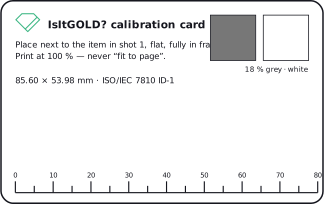
On screen the card is drawn at its physical size, but screens vary — only the printed copy, checked against the ruler, is a valid reference.